
Microsoft Update Catalog
Microsoft - Download Center
Microsoft - Software Download
Windows Blog
Windows 10 articles - Everything about Microsoft Windows 10
Windows Insider Program
Windows Blog - Windows Insider Program
Windows 10 Insider Preview ISO
Paths in Windows 10
Shared Start Menu and desktop:
C:\ProgramData\Microsoft\Windows\Start Menu\Programs
C:\Users\Public\Desktop
User Start Menu and desktop:
C:\Users\your user name\AppData\Roaming\Microsoft\Windows\Start Menu\Programs
C:\Users\your user name\Desktop or C:\Users\your user name\OneDrive\Desktop
How to use registry info to uninstall programs
Program Is Not Listed in Add/Remove Programs After Installation
HKEY_LOCAL_MACHINE\SOFTWARE\Microsoft\Windows\CurrentVersion\Uninstall
Misc. info
Why does Windows update take so long? [SOLVED]
Windows 10: Find Who is Logged in
Solved: How Do I Fix “Windows is already using that name. Please enter a different username” Error?
5 Ways to See All User Accounts Existing on Windows 10
Windows 10 Game Bar
Open / access Game Bar
 + G
+ G
If your PC supports the hardware requirements, Game Bar can be used for:
- Record videos (with sound) playing in a application window.
- Capturing still shots of the the active window.
The default path to the folder where videos and images are saved is: C:\Users\your user name\Videos\Captures
Snip & sketch
Open Snip & sketch:
+ Shift + S
Snipping tool
Open snipping tool
| Windows 10: | Select the Start button , type snipping tool in the search box on the taskbar, and then select Snipping Tool from the list of results. |
| Windows 8.1 / Windows RT 8.1: | Swipe in from the right edge of the screen, tap Search (or if you're using a mouse, point to the lower-right corner of the screen, move the mouse pointer up, and then select Search), type snipping tool in the search box, and then select Snipping Tool from the list of results. |
| Windows 7: | Select the Start button , type snipping tool in the search box, and then select Snipping Tool from the list of results. |
Capture a snip of a menu
- After you open Snipping Tool, open the menu that you want to capture. For Windows 7, press the Esc key before opening the menu.
- Press Ctrl + PrtScn keys. The entire screen changes to gray including the open menu.
- Select Mode, or in earlier versions of Windows, select the arrow next to the New button. Select the kind of snip you want, and then select the area of the screen capture that you want to capture.
Where to find most of Windows 10s native icons
%systemroot%\system32\imageres.dll
%systemroot%\system32\shell32.dll
%systemroot%\system32\pifmgr.dll
%systemroot%\explorer.exe
%systemroot%\system32\accessibilitycpl.dll
%systemroot%\system32\ddores.dll
%systemroot%\system32\moricons.dll
%systemroot%\system32\mmcndmgr.dll
%systemroot%\system32\mmres.dll
%systemroot%\system32\netcenter.dll
%systemroot%\system32\netshell.dll
%systemroot%\system32\networkexplorer.dll
%systemroot%\system32\pnidui.dll
%systemroot%\system32\sensorscpl.dll
%systemroot%\system32\setupapi.dll
%systemroot%\system32\wmploc.dll
%systemroot%\system32\wpdshext.dll
%systemroot%\system32\compstui.dll
%systemroot%\system32\ieframe.dll
%systemroot%\system32\dmdskres.dll
%systemroot%\system32\dsuiext.dll
%systemroot%\system32\mstscax.dll
%systemroot%\system32\wiashext.dll
%systemroot%\system32\comres.dll
%systemroot%\system32\mstsc.exe
actioncentercpl.dll, aclui.dll,
autoplay.dll, comctl32.dll, xwizards.dll, ncpa.cpl,
url.dll (all in %systemroot%\system32\)
Källa: Windows 10 icons. Where are they located? In which files and folders?
Windows system administration
Understanding Windows Administration Tools
What Are the SysInternals Tools and How Do You Use Them?
How to use Windows 10's File History backup feature
Windows 10: The best tricks, tips, and tweaks (slideshow)
Windows Task Manager: The Complete Guide
Codecs: frequently asked questions
Codecs: frequently asked questions
How can I find out which codecs are installed on my PC?
On the Help menu in Windows Media Player, select About Windows Media Player. If you don't see the Help menu, select Organize > Layout > Show menu bar.
In the About Windows Media Player dialog box, select Technical Support Information. Your web browser will open a page that includes a lot of detailed info about the related binary files, codecs, filters, plug-ins, and services installed on your PC*. This info should help you troubleshoot problems.
* Page with detailed multimedia info: file:///C:/Users/user name/AppData/Local/Temp/wmpsupport.htm
CertUtil
The CertUtil is a pre-installed Windows utility, that can be used to generate hash checksums:
CertUtil -hashfile pathToFileToCheck [HashAlgorithm]
HashAlgorithm choices: MD2 MD4 MD5 SHA1 SHA256 SHA384 SHA512
So for example, the following generates an MD5 checksum for the file C:\TEMP\MyDataFile.img:
CertUtil -hashfile C:\TEMP\MyDataFile.img MD5
Microsoft PowerToys for Windows 10
All Microsoft’s PowerToys for Windows 10, Explained
microsoft/PowerToys (GitHub)
Record sound from your PC
OneDrive-streamingtjänsten för Groove Musik
Den 31 mars 2019 upphör OneDrive-streamingtjänsten för Groove Musik. Du kan fortfarande använda Windows 10 Groove Musik-appar för datorn och Windows Phone till att spela upp all musik som du har laddat ned, men du kommer inte längre att kunna använda den för streaming av OneDrive-innehåll.
Windows 10 major updates info
How to change paths/location for default folders in Windows 10
How to move default user folders to a new location
Migrate Your Files to OneDrive Easily with Known Folder Move
How to reset/restore OneDrive in Windows 10
Reset OneDrive to fix OneDrive problems on Windows 10
Fix: OneDrive Icon Is Missing From Windows 10 Taskbar
CMD info
How to customize Command Prompt using Terminal tab on the Windows 10 May 2019 Update
Files:
- clip_exe.txt
- cmd_exe.pdf
- Command Redirection, Pipes - Windows CMD
- Echo - Windows CMD
- echo off vs @echo off_ What's the difference
- How do I open a program via the command prompt in Windows 8
- How to start 2 programs simultaniously in windows command prompt
- Quotes, Escape Characters, Delimiters - Windows CMD
- Start - Start a program - Windows CMD
CMD desktop shortcut with auto-completion of pathnames enabled
Shortcut target/command: C:\Windows\System32\cmd.exe /F:ON
Find Windows 10 Product Key
Users can retrieve it by issuing a command from the command prompt.
Press Windows key + X
Click Command Prompt (Admin) or Windows PowerShell (Admin)
At the command prompt, type wmic path SoftwareLicensingService get OA3xOriginalProductKey
NOTE: In most cases you really shouldn't use the product key obtained using the above method. Windows 10 free upgrades uses a digital license for activation and in those cases a product key isn't needed nor does it work. If you installed Windows 10 from a media that came with a product key, use that key instead. If in doubt, contact Microsoft for support. That said, I guess the product key obtained with the above method could come in useful in some very, very, very special circumstances regarding the computer from which is was obtained. Never done anything with it myself though so use that key with caution.
Windows 10 Product Key And Activation: How To Find It And How It Works
How to Find your Windows 10 Product Key
How to Use Your Free Windows 10 License After Changing Your PC’s Hardware
Aktivering i Windows 10
Misc. info
Tool to use for installing Windows 10
For example, the tool can be used if:
- You have a license to install Windows 10 and are upgrading this PC from Windows 7 or Windows 8.1.
- You need to reinstall Windows 10 on a PC on which you’ve already successfully activated Windows 10.
Thanks to my colleague Örjan Berger for making me aware of the page & tool.
Misc. info
https://technet.microsoft.com/en-us/itpro/windows/deploy/windows-deployment-scenarios-and-tools (Windows 10)
https://developer.microsoft.com/en-us/windows/hardware/windows-assessment-deployment-kit#winADK
What is Windows System Image manager?
Group Policy Manangement Console
Group Policy for Beginners
Edit Administrative Template Policy Settings
https://www.howtogeek.com/tips/how-to-see-which-group-your-windows-user-belongs-to/
https://superuser.com/questions/611839/how-can-i-find-out-which-user-groups-my-domain-user-belongs-to
Open a command prompt.
Type: net user username /domain
It will list both Local and Global groups that user belongs to.
If you want it to only list the groups, you can use Find to filter it:
net user username /domain | find "Group"
This has worked in all (NT) versions of Windows since at least NT 4.
on Vista/2008+ you can also use the command WhoAmI /Groups to get a verbose list of group memberships
(including their UIDs, etc.) for the current user.
https://www.windows-commandline.com/list-of-user-groups-command-line/
net localgroup
Use the below command to know the list of members of a group from command line.
net localgroup groupName
For example to get the list of all remote desktop users on a system we can run the below command.
net localgroup "Remote Desktop users"
How to find the list of all groups a user is member of?
You can run the below command to list the groups a user is member of.
This command prints the details of the given user account. You can find
the group membership information in the last two line of this command output.
net user userName
Where userName is the user name of the user about whom you want to get info about group memberships.
Windows MAX_PATH info (Applies ONLY to Windows 10 version 1607 and later versions)
Tip Starting in Windows 10, version 1607, MAX_PATH limitations have been removed from common Win32 file and directory functions. However, you must opt-in to the new behavior.
A registry key allows you to enable or disable the new long path behavior. To enable long path behavior set the registry key at HKLM\SYSTEM\CurrentControlSet\Control\FileSystem LongPathsEnabled (Type: REG_DWORD). The key's value will be cached by the system (per process) after the first call to an affected Win32 file or directory function (list follows). The registry key will not be reloaded during the lifetime of the process. In order for all apps on the system to recognize the value of the key, a reboot might be required because some processes may have started before the key was set.
Run regedit
Go to HKEY_LOCAL_MACHINE\SYSTEM\CurrentControlSet\Control\FileSystem
Change LongPathsEnabled REG_DWORD value to 1
Reboot computer
More info:
Naming Files, Paths, and Namespaces - Maximum Path Length Limitation
How to Make Windows 10 Accept File Paths Over 260 Characters
Windows general info (DWORD Value) - Changing the startup mode of a service
All services have a setting controlling how they are started either manually, automatically or disabled. This setting can be changed through the registry.
Open your registry and locate the key below.
System Key: [HKEY_LOCAL_MACHINE\SYSTEM\CurrentControlSet\Services]
Value Name: Start
Data Type: REG_DWORD (DWORD Value)
Listed under this key are subkeys representing the devices and services on the system.
Open the subkey corresponding to the service you wish to change, and modify the value of 'Start' to equal either "2" (for automatic), "3" (for manual) or "4" (for disabled)
Source:
Changing the Startup Mode of a Service (Windows NT/2000)
Info on Windows 10 november upgrade (version 1511 10586)
http://windows.microsoft.com/en-my/windows-10/windows-update-faq
Windows 10 November update info (Upgrade to Windows 10 Pro, version 1511, 10586)
https://techjourney.net/how-to-download-official-windows-10-build-10586-v-1511-mct-iso-adk-sdk-wdk-hlk-mobile-emulator/
https://techjourney.net/download-windows-10-1511-th2-10586-iso-create-usbdvd-installation-media/
https://www.microsoft.com/en-us/software-download/techbench
What the fuck is this?
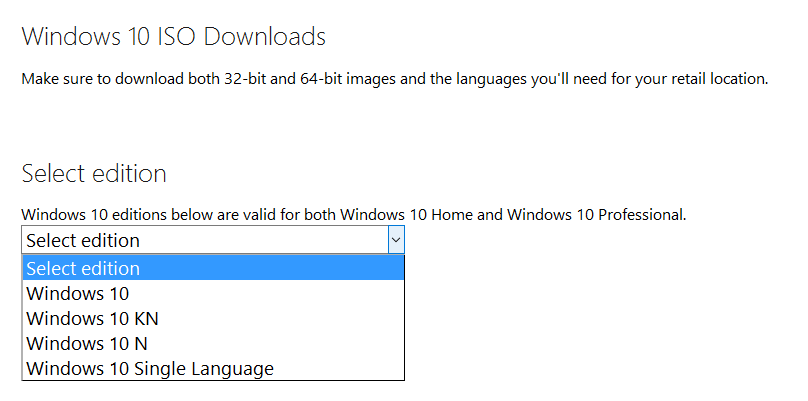
http://winsupersite.com/windows-10/what-are-windows-10-n-and-kn-editions
Due to a ruling for anti-competitive practices by the European Commission in 2004, Microsoft has been forced to maintain special editions for its Windows operating systems. Labeled "N" for Europe and "KN" for Korea, these editions include all the base features of the operating system but without Windows Media Player and related technologies pre-installed. For the Windows 10 editions, this includes Windows Media Player, Music, Video, Voice Recorder and Skype.
If you reside in and purchase a PC in a country required to use the N and KN editions, you receive a computer without media technologies. This can cause some headaches, particularly when using apps and visiting web sites that have been coded to utilize the built-in Windows media capabilities. For a full list of excluded features, check out Media feature pack for Windows 10 N and Windows 10 KN editions on the Microsoft support site.
http://www.microsoft.com/sv-se/download/details.aspx?id=48231
- Media Feature Pack för N- och KN-versionerna av Windows 10
https://www.microsoft.com/sv-se/software-download/windows10
http://www.redmondpie.com/download-windows-10-1511-build-10586-iso-november-update/
Download Windows 10 media creation tool
32-bit machines
64-bit machines
http://www.redmondpie.com/download-windows-10-pro-iso-file-without-product-key-from-microsoft/